Frequently Asked Questions
Do I need to create a new connector when my Jira data changes?
No. Your connector acts like a smart filter that remembers what data to fetch, not a one-time snapshot. Each time you refresh in Tableau, it automatically retrieves the latest data based on your filter criteria. You only need to create a new connector if you want to change your filters (like switching to a different project) or add different fields.
If I delete issues in Jira will they disappear from Tableau?
Yes. Deleted issues will be removed from your Tableau data on the next refresh. The connector always reflects the current state of your Jira instance.
What permissions does the Access Token need?
Your Access Token needs permission to view all the Jira data you plan to bring into Tableau. The token inherits the permissions of the user who created it, so if you can see it in Jira, the token can access it as long as you didn't create it with limited scope. If you do want to limit what data the connector can access, create an Access Token with limited scope when generating it in your Atlassian account settings.
Why do some fields become separate tables?
Fields that can contain multiple values per issue (like Linked Issues, Sprints, or Comments) become separate tables to maintain proper data structure in Tableau. This prevents issues like duplicate rows or concatenated values that would make analysis difficult. Each related table links back to the main Issues table using the Issue Key. Learn more about multi-table data →
What's the maximum number of issues I can pull into Tableau?
We don't enforce a hard limit on the number of issues. However, extremely large datasets (especially those with many fields selected) may fail due to request timeouts or Atlassian's rate limits. If you're working with tens of thousands of issues, we recommend selecting only the fields you actually need for your reports to improve performance and reliability.
Troubleshooting
Custom Domain Issues
If your organization uses a custom domain for Jira (any domain that doesn't contain atlassian.net), our connector will not work properly without additional configuration.

According to Atlassian's documentation, custom domains are not guaranteed to work with marketplace apps. However, we can fix this for you!
Solution: Email us at support@pallas-apps.com with your original Atlassian URL (your Jira admin can find this in your organization settings). We'll create a mapping from your custom domain to your Atlassian domain so our app can properly access your Jira API.
Invalid Credentials Error
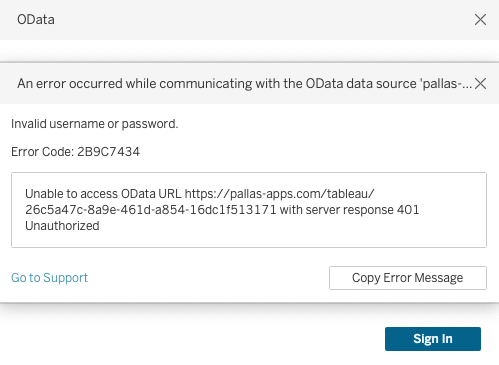
If you're seeing an "Invalid username or password" error even though you believe your credentials are correct, it's usually one of two issues:
- You're using your Jira password instead of an Access Token: The connector requires an Atlassian API Access Token, not your regular Jira password. You need to generate an Access Token from your Atlassian account settings.
- Your Access Token has expired: Access Tokens can expire or be revoked. Try generating a new Access Token and updating your credentials in Tableau.
Still Need Help?
Our support team is here to assist you with any issues you're experiencing.